Meta Data
Meta data is important information that is not directly captured from a measurement but can rather be thought of as a snapshot of experiment equipment, capturing operation conditions at data collection. Such meta data can be extremly beneficial in post-processing as it serves as detailed log which measurement operation has been performed in which experimental environment.
Meta Data Plot
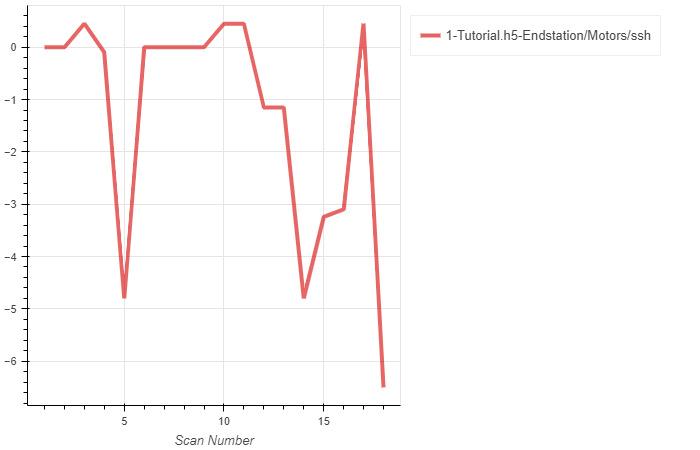
Given that multiple scans are stored per file, we can plot meta data as a function of scan number
bl = LoadBeamline()
bl.load(config,'Filename.h5','path to variable')
bl.plot()
Create “Loader” object
Enter the file name of the scan to analyse (‘FileName.h5’) and configuration
Options for path to variable quantities include:
All directory paths within the specified h5 file
Spreadsheet/Logbook
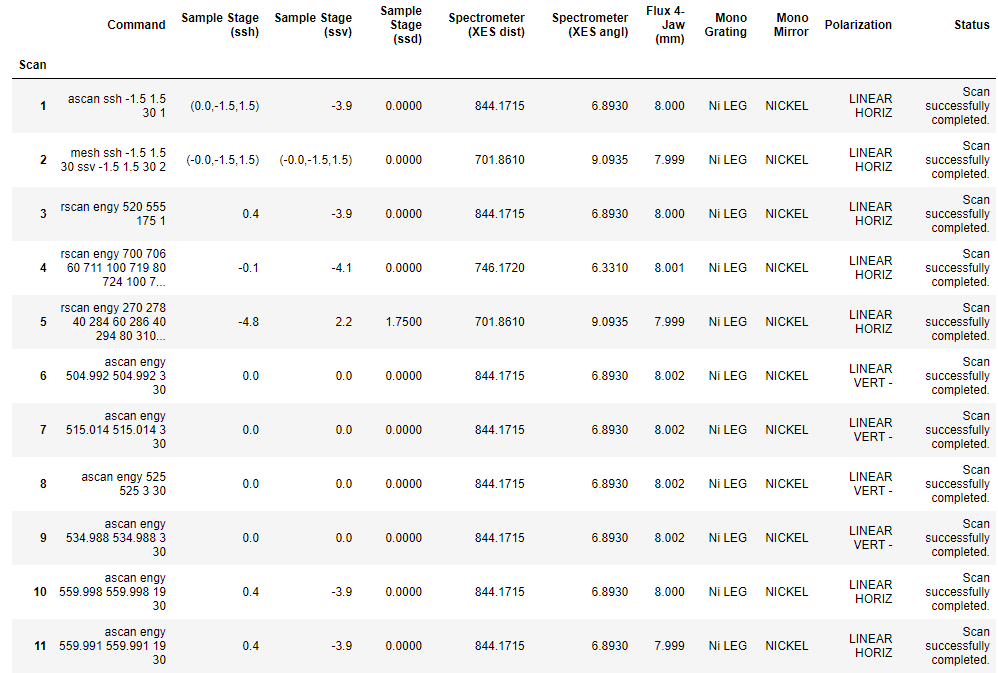
df = LoadLog()
df.load(config,'Filename.h5',columns,average=True)
df.show() # Shows the log (data frame) interactively
df.export('filename.csv') # export to csv
Create “Loader” object
Enter the file name of the scan to analyse (‘FileName.h5’) and configuration
Options for columns quantities include:
Custom dictionary with column headers and quantities, see example below:
columns = dict()

columns['Command'] = 'command'
columns['Sample Stage (ssh)'] = 'Endstation/Motors/ssh'
columns['Sample Stage (ssv)'] = 'Endstation/Motors/ssv'
columns['Sample Stage (ssd)'] = 'Endstation/Motors/ssd'
columns['Spectrometer (XES dist)'] = 'Endstation/Motors/spd'
columns['Spectrometer (XES angl)'] = 'Endstation/Motors/spa'
columns['Flux 4-Jaw (mm)'] = 'Beamline/Apertures/4-Jaw_2/horz_gap'
columns['Mono Grating'] = '/Beamline/Monochromator/grating'
columns['Mono Mirror'] = '/Beamline/Monochromator/mirror'
columns['Polarization'] = 'Beamline/Source/EPU/Polarization'
columns['Status'] = 'status'
Multiple meta data items may be combined as tuples, i.e. (‘comment1’,’comment2’), and get added as one column to the log Rounding may be applied to numbers, i.e. [‘/path/to/item’,int] where int stands for the number of decimal places
Specify average boolean
If False, return all data (even if 1d array)
If True, return average of 1d array where applicable